Regular Expression Guide
Regular Expressions or regex are a sequence of characters that forms a pattern used to search character combinations in string values.
This article serves as a guide on how to write regex for some Strato features that may need regex values.
Tokens and Characters
- To get a specific character, type the exact character.
- To get only a specific range of characters, type the range in square brackets
[].- Examples:
[a-z]targets lowercase characters.[A-Z]targets uppercase characters.[a-zA-Z]targets both lowercase and uppercase characters.[0-9]targets digits from 0 to 9.
- There are specific shorthands that target certain character classes:
\dtargets digits from 0 to 9. Equivalent to[0-9].\wtargets word characters. This includes lowercase and uppercase characters, digits, and underscores. Equivalent to[a-zA-Z0-9_].\stargets whitespace characters. This includes tabs, spaces, and new line characters.\Dis the opposite of\dand targets anything that is not a digit.\Wis the opposite of\wand targets anything that is not a word character.\Sis the opposite of\sand targets anything that is not a whitespace character.
- To get any character except line breaks, type a period
.. - To get any special character by itself, type a backslash
\first before the special character.- Examples:
\.targets a period.\\targets a backslash.\(targets an open round bracket.
Quantifiers
Quantifiers determine how many characters should be taken.
Specific
You can specify numbers in a quantifier using curly brackets {}.
- To get an exact number of characters, type a number inside the curly brackets.
- Example:
\D{5}targets five non-digit characters.
- Example:
- To get an X to Y number of characters, type two numbers inside the curly brackets separated by a comma.
- Example:
\w{5,9}targets five to nine word characters.
- Example:
- To get X or more characters, type a number and a comma inside the curly brackets.
- Example:
\d{8,}targets eight or more digits.
- Example:
- To get X or less characters, type a comma and a number inside the curly brackets.
- Example:
\d{,8}targets eight or less digits.
- Example:
Greedy
Greedy quantifiers will select as many characters as possible, and output the longest match.
- To get one or more characters, type a plus
+after the character. - To get zero or more characters, type an asterisk
*after the character. - To get zero or one character, type a question mark
?after the character.
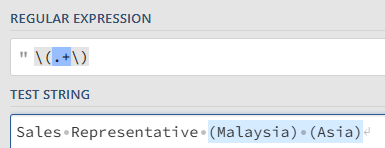
For example, in the string Sales Representative (Malaysia) (Asia), the regex pattern \(.+\) will output (Malaysia) (Asia).
Lazy
Lazy quantifiers will select as few characters as possible, and output the shortest match. To make a quantifier lazy, add a question mark ? after any of the specific or greedy quantifiers.
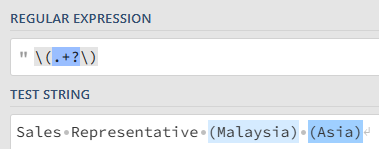
For example, in the string Sales Representative (Malaysia) (Asia), the regex pattern \(.+?\) will output (Malaysia) and (Asia) separately.
Modifiers
- To create an extraction or capturing group, type your regex pattern inside round brackets
(). This will output only what is inside the round brackets.- Example: In the string
Sales Representative (Asia), the regex pattern(.*?)\s*\(will outputSales Representative. 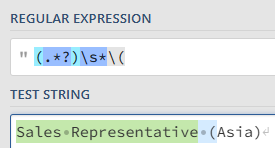
- To set the position of your search at the beginning of the string, type a caret
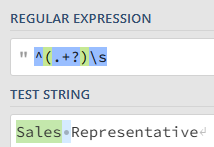
^at the beginning of your regex pattern.- Example: In the string
Sales Representative, the regex pattern^(.+?)\swill outputSales. - a
- Example: In the string
- To set the position of your search at the end of the string, type a dollar sign
$at the end of your regex pattern.- Example: In the string
Sales Representative, the regex pattern\s(.+?)$will outputRepresentative. 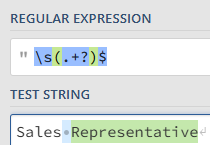
- Example: In the string