User Authorisations
User Authorisations are rules that limit what users can or cannot do. Authorisations can be grouped together to create a Role that would then be assigned to a user. The authorisations are listed per user role as shown in the sample image below.
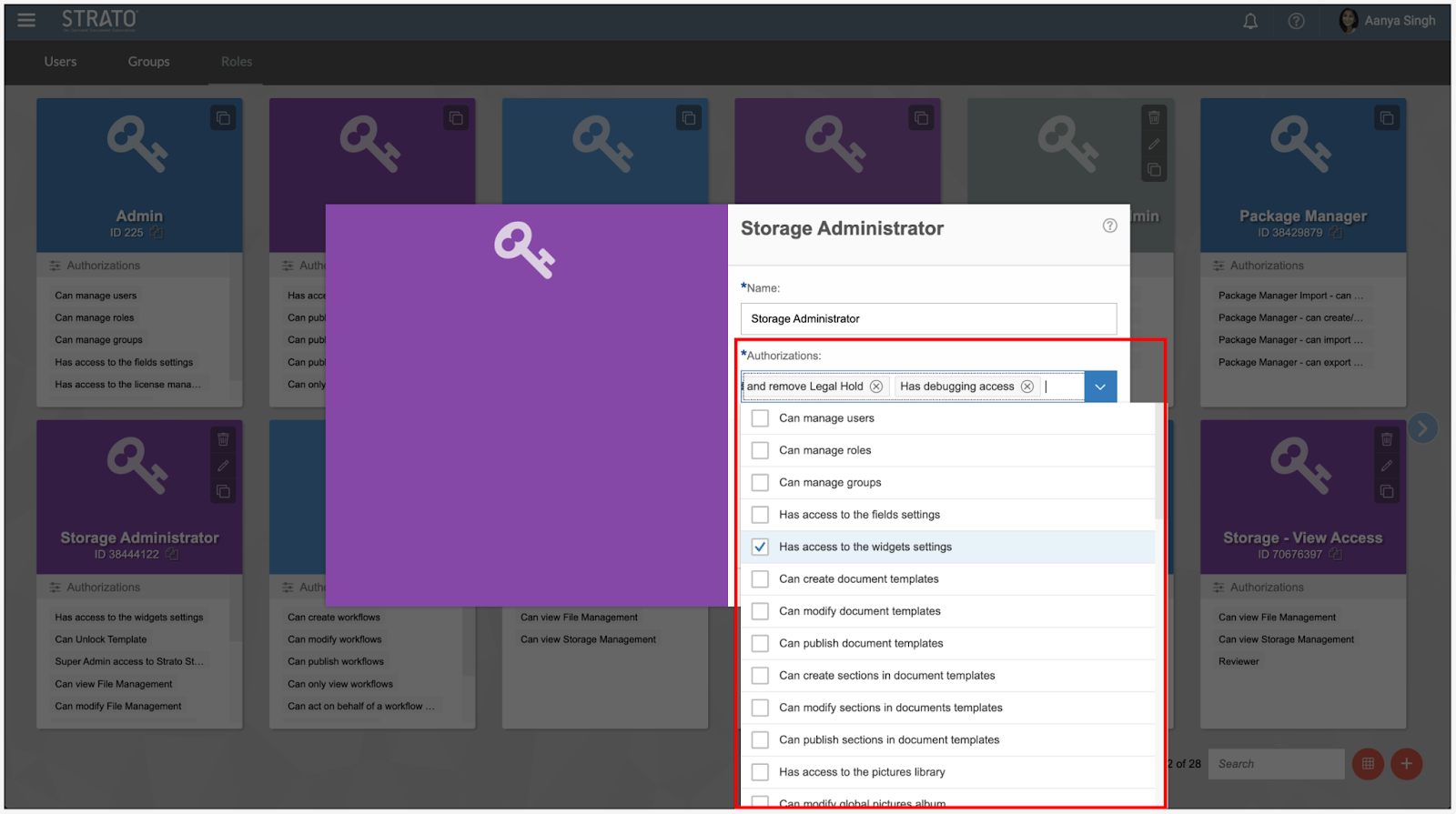
Refer to the article User Roles for information on groups that can be created based on the set of authorisations per role.
The table below displays the list of authorisations available for use when creating a role.
| Strato Authorisations | Description |
| Can manage users | Allows users to create, modify, and delete user accounts within the system. They have the ability to set user permissions, roles, and access levels. |
| Can manage roles | Can create, modify, and delete roles within the system. Roles define permissions and access levels assigned to users. |
| Can manage groups | Enables users to create, modify, and delete groups within the system. |
| Has access to the fields settings | Can access and configure the settings related to fields within the system. |
| Has access to the widgets settings | Allows users to access the settings and configurations of widgets within the system. |
| Can create document templates | Can create document templates in Strato. |
| Can modify document templates | Allows users to make changes and updates to existing document templates. They can modify the structure and content of the templates. |
| Can publish document templates | Can publish document templates, making them available for others. |
| Can create sections in document templates | Enables users to create new sections within document templates. Sections help organise content or functionality within a template. |
| Can modify sections in documents templates | Can make changes and updates to existing sections within document templates. They can modify the layout and content of sections. |
| Can publish sections in document templates | Allows users to publish sections within document templates. |
| Has access to the translation components | Allows users to configure and manage the translation components. |
| Can create workflows | Can create new workflows which define and automate processes. |
| Can modify workflows | Enables users to make changes and updates to existing workflows. They can modify the workflow design, steps, conditions, or actions. |
| Can publish workflows | Can publish workflows, making them available for use by others within the system. |
| Can only view workflows | Allows users to view existing workflows but not make any modifications. |
| Can act on behalf of a workflow actor | Can perform actions or tasks on behalf of a designated workflow actor. They have the ability to act as a substitute for executing workflow steps. |
| Can stop a workflow | Enables the ability to stop or halt the execution of a workflow manually. |
| Can restart workflow in error | Can restart a workflow that encountered an error during execution. |
| Can Unlock Template | Allows users to unlock templates or sections for editing or modification. |
| Super Admin access to Strato Storage | Provides super admin-level access to Strato Storage, granting control and management capabilities over the storage system. |
| Can view File Management | Can view files within the File Management system. They can access file information such as metadata, properties, etc. |
| Can modify File Management | Enables users to modify files within the File Management system. They can perform actions such as editing, moving, or deleting files. |
| Can view Storage Management | Can view and access the Storage Management system, which includes information about storage from several users and their files. |
| Can perform modifications in Storage Management | Allows users to make modifications and adjustments to storage settings and configurations within the Storage Management system. |
| Can re-assign files between users in Storage Management | Can re-assign files from one user to another within the Storage Management section. |
| Can create and modify Rules, Categories and Metadata | Allows users to create and modify rules, categories, and metadata in Strato. |
| Can change validity dates/document | Can change the validity dates of documents or other relevant data. |
| Can perform mass update of validity dates and category of documents | Allows users to perform updates to validity dates and categories of multiple documents. |
| Can add and remove Legal Hold | Enables users to add or remove legal holds on documents or data within the system. Legal holds ensure the preservation of data for legal or compliance purposes. |
| Package Manager Import - can overwrite all conflicts | Can import packages using the Package Manager and overwrite any conflicts that may arise during the import process. |
| Package Manager - can create/modify packages | Allows users to create or modify packages using the Package Manager. Packages are collections of files or data that can be distributed or shared. |
| Package Manager - can import packages | Can import packages using the Package Manager. |
| Package Manager - can export packages | Allows users the ability to export packages using the Package Manager. They can create packages for external distribution or sharing. |
| Has debugging access | Allow access to debugging tools and features in Strato in which they can troubleshoot and analyse the error encountered in the system. |
| Reviewer | Allows users to review files marked for deletion in Strato Storage. |
| Can view external users | Enables users to view and manage external users' access in User Management and files in Storage Management. |
| Can change proxy | Allows external users to act as a proxy for another user with SuccessFactors access. |
| Can access upgrade center | Allows users to access the Upgrade Centre. |
| Can install and uninstall alpha | Allows users with access to the Upgrade Centre to install and uninstall alpha versions of enhancements. |
| Can install and uninstall beta | Allows users with access to the Upgrade Centre to install and uninstall beta versions of enhancements. |