πŸ“„ Configure SAP OData Settings [V1]

Configure SAP OData Settings


You can integrate your on-premise system to Strato by filling this box. This will allow you to execute reports from your on-premise system via Web Reporting.
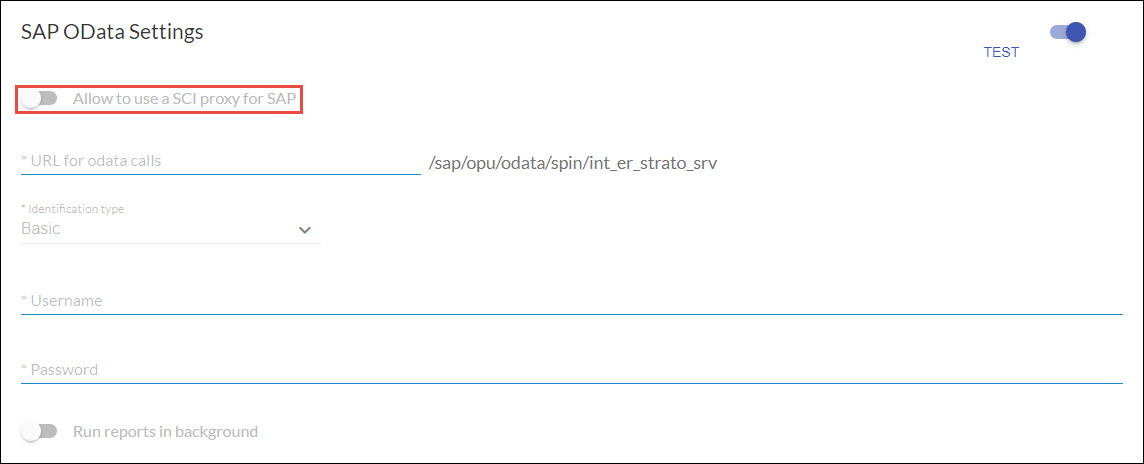

Allow to use SCI Proxy for SAP
When this is enabled, Strato would connect to the SCI Proxy instead of directly connecting to the SAP On-premise system.
URL for odata callsThis is the URL of the SAP system that is connected to your Strato system.
Identification type

There are 2 possible options for this dropdown box.

  • Basic - the Username and Password entered below will be used in retrieving the fields from the SAP system. 
  • SAP Logon Detail - the authorizations of the user who will log-on to the Strato system will be used. The entered Username and Password below will be ignored. This option is only available if your SSO Settings type is SAP Logon. 
Username & PasswordThis is the username and password of the user in the SAP system in the URL for odata calls. The authorizations will only take effect if the identification type selected above is Basic. 
Run reports in background
  • When the Run reports in background option is enabled, this will execute Easy Reporter respecting the SAP HR authorization of the user logged on in SuccessFactors.
  • When this option is disabled, this will execute Easy Reporter to get data and run the reports using the authorization of the API user. (Note: All executions of Easy Reporter will be done by the API user regardless of whoever is logged on in SuccessFactors.)