Document Settings [V1]
Document Settings allows document editors to rename their Document Template, add its description, and see versioning details. More details about this screen are in the table below.
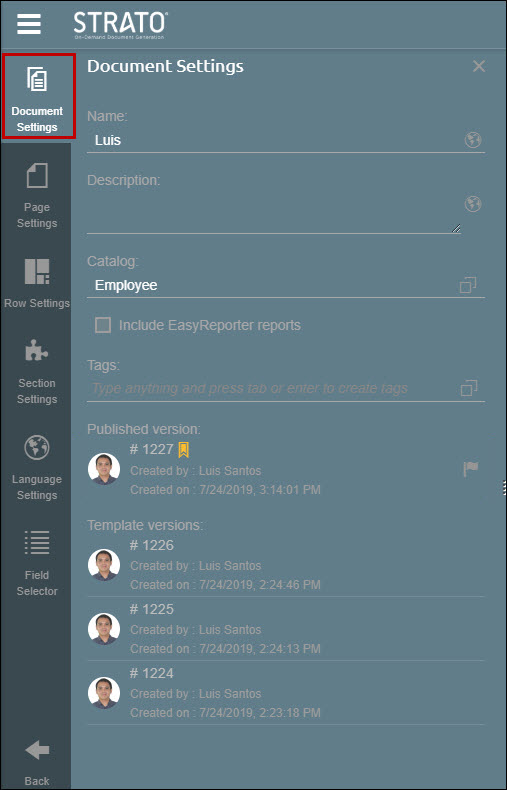
Name | Displays the name of your document. You can change the name of your document as needed. |
Description | A text box you can use to provide a description for your document. |
Catalog | Displays the catalog that the document is using as a source of fields. Switching catalogs would clear the fields in the document. |
Include Easy Reporter reports | This is only available if you have Easy Reporter installed in your on-premise system and enabled in your Strato Administration Tool. This will allow the usage of fields from reports in Easy Reporter together with the fields from the selected Catalog. At least one report must be selected. To know how to use this function, read: Creating a Hybrid Document Using Fields from Both SFSF and Easy Reporter |
Tags | Tags can be added to your document so that you easily search for documents. |
Published version | Starting version 1.11, documents have the versioning feature. Versioning allows you to have and store multiple versions of a document every time it is saved. These versions serve as logs and will track the revision history of the document. From these stored versions, you can select which version should be published. |
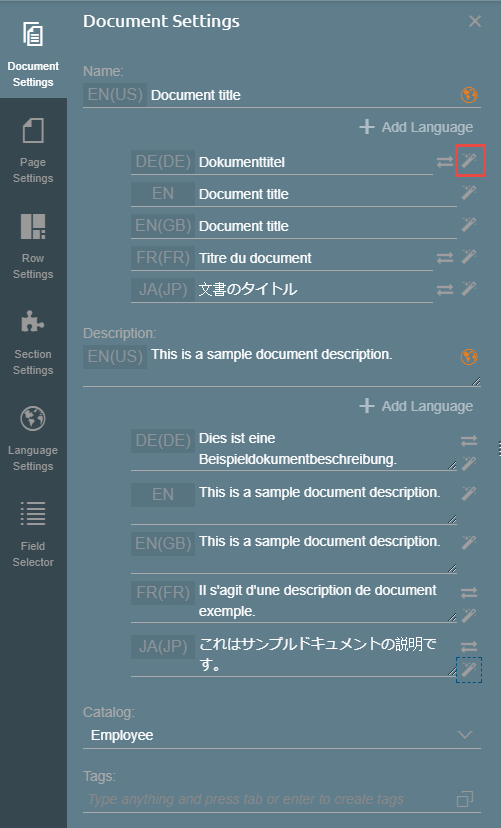
You can translate the Document Name and Document Description using the Add Language function, and clicking the Wand icon on the right side to automatically translate the texts. This setting functions as Google Translate.