Strato Workflow Storage (Add-On Feature)
Overview
As Strato Workflow is designed to automate HR and Payroll activities to make a more optimized end-to-end HR process, part of Strato Workflow's capability (as an add-on feature) is to be able to automate the storing of documents within the workflow process. This gives the capability to upload generated documents either within:
Strato Storage
- Recruiting - documents that can be saved for the Hiring Manager or the Recruiter
- Employee Central - documents can be stored for any Employee (Admin, Managers, or Employees)
- Talent - documents can be stored under Employee or any employee (talent card)
- SuccessFactors Recruiting - documents can be saved in the Candidate's Profile
- SuccessFactors Storage - can be saved in a custom MDF object in Employee Central (from version 1.15)
Sample Use Case
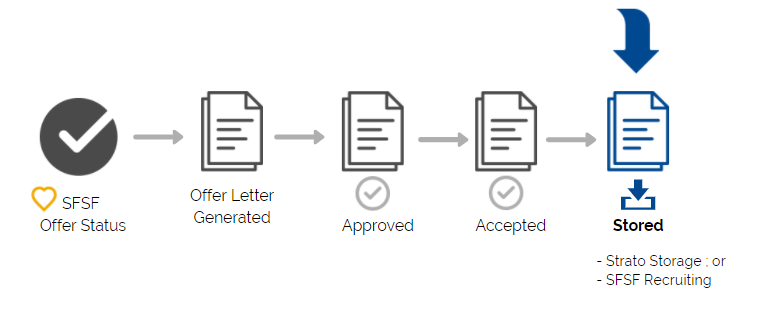
As an example, in a standard Recruitment process, Strato Workflow can be automatically triggered by the Offer status change in SuccessFactors. Once all the steps have been executed from Job Offer generation to the approval of the Job Offer letter by the candidate, the final step of the workflow can be the storing or uploading of the approved Job Offer letter to the Candidate’s profile in SuccessFactors Recruiting.
Enable Feature in Strato Admin
Before this can be configured within Strato Workflow, the Document Storage Settings need to be enabled first in the Strato Admin tool. Once enabled, the selection for storing destinations will then be available in the Store Document step in the workflow template.
To know how to enable this feature in Strato Admin, read: Document Storage Settings.
Related articles
- Enabling Strato Storage / Workflow Storage Feature in Strato Admin
- Store Document Step (Workflow)
- Strato Storage - Overview (Strato Documents)