Datasource Fields in Strato Workflow [V1]
In Strato Automate, one of the ways to get data to be used and passed within the workflow is via the Datasource Field. Using this function, fields can be mapped to retrieve records from SuccessFactors such as Employee/Candidate information like name, home address, email address, position and salary information, and more.
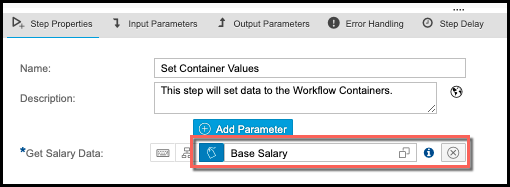
The sample screen below shows the settings on a workflow step to set a container value via the Datasource Field. The data is captured from the "Base Salary" SuccessFactors data.
The following workflow components/workflow steps use the Datasource Field function to retrieve SuccessFactors data:
- User Decision (to map email address, password, and signature fields)
- Request File (to map an email address)
- Store Document (to map the owner of the document)
- Set Container Values (to set data to a parameter)
- Multipart Builder - Call External Services
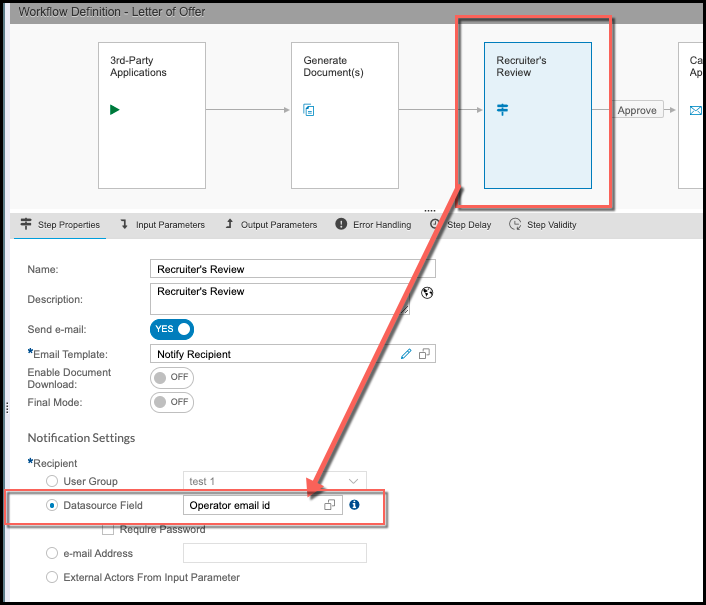
Another given example below is a workflow for executing a Letter of Offer. Strato Automate should be able to know which recipient the generated Offer Letter document should be forwarded to. This means that the workflow should be able to capture the recipient's email address record from SuccessFactors.
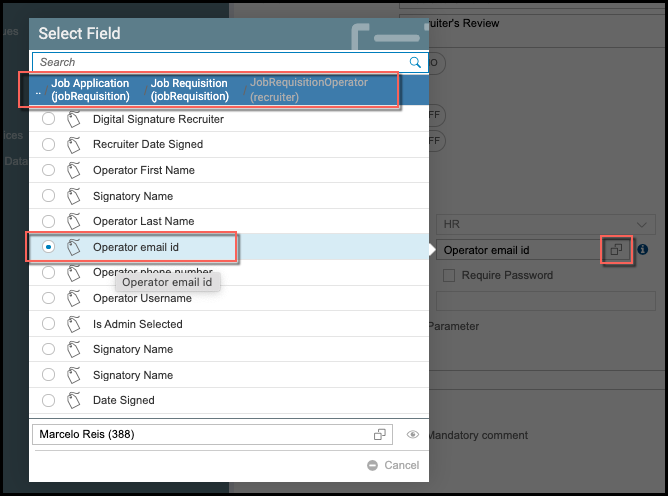
In this sample scenario below, the generated Offer Letter document will be sent to the Recruiter first for review before sending it to the Candidate for acceptance. It is highlighted below that in the Recruiter's Review workflow step, the Recruiter's email address will be retrieved from the data field called "Operator email id." This field is coming from the API path: Job Application > Job Requisition > JobRequisitionOperator, and this was mapped via the Datasource Field within the User Decision step's Properties.
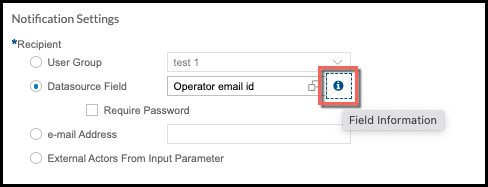
Moreover, when a field is selected in a Datasource Field, there's a Tooltip function available to be able to view the field information and to know where the selected field assigned was derived from. From here, you can also view if there are key fields assigned to the selected field, or you can assign key fields if there are none.
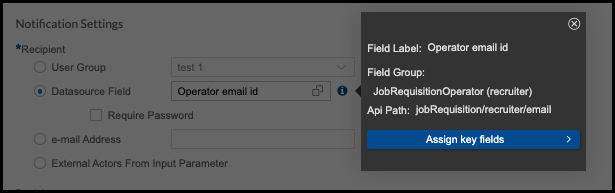
To know more about the Tooltip and Assign Key Fields functions, please read: View Datasource Field Properties and Assign Key Fields (Tooltip)