Strato 2025-18
The 2025-18 release brings new features and enhancements focused on data security, confidentiality, visibility, and integration.
Strato Document Generation now features Workflow Monitoring, providing users with enhanced visibility into the statuses of all executed Workflows. This new capability allows for greater transparency and easier tracking of document generation processes.
Strato also introduces configurations for AI providers, giving organizations the choice between Strato AI and SAP BTP AI Launchpad for powering Auto Classification of Files, while laying the foundation for future AI integrations.
See all of these new features and enhancements documented in detail below:
New Features
Strato Document Generation
Workflow Monitoring in Strato V2
Users can now monitor all executed Workflows with the new Workflow Monitoring page in Strato V2. This tool provides visibility into your Workflows' execution history.
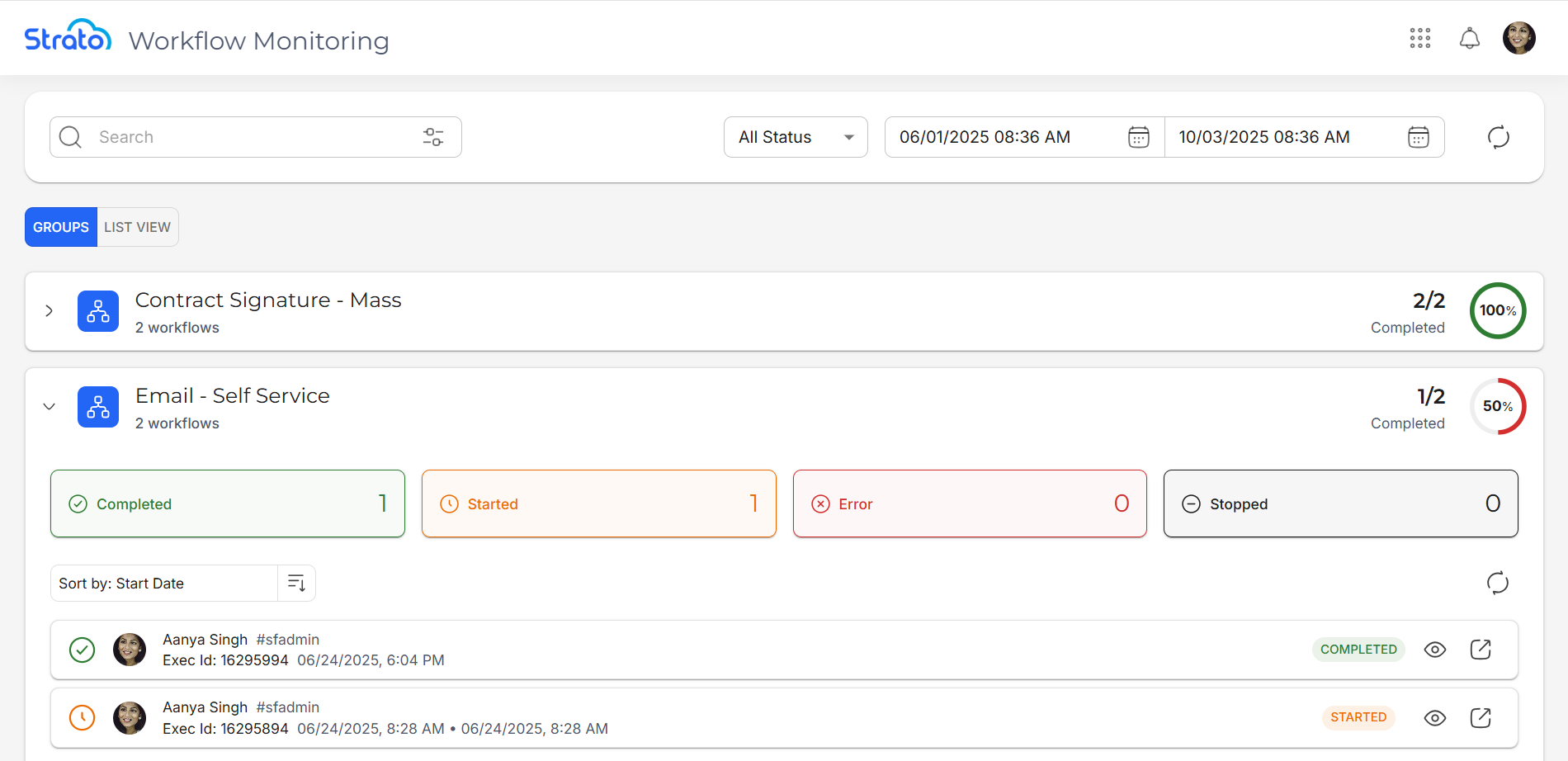
Workflows can be viewed by group or in a list view, showing details such as completion rates, pending actors, and step-by-step progress in a timeline. This enhancement makes it easier for admins, HRs, and managers to track workflows, confirm successful runs, and quickly identify failures.
Enhancements
Strato Platform
Configuration of AI Providers for Strato's AI Tools
Users can now choose which AI service powers Auto Classification of Files in Strato. A new configuration option allows selection between Strato AI (default) or SAP BTP AI Launchpad, ensuring flexibility to align with organizational preferences. This update also lays the foundation for future AI integrations in Strato, ensuring customers are ready to benefit from upcoming intelligent features.
Secure Storage of API Certificates in Strato Admin Tool
All SuccessFactors API certificates are no longer shown in the Strato Admin Tool to ensure important credentials are safe and secure.
Other Updates and Corrections Delivered
Strato Platform
Employee Profile Photo Not Displayed
[Component: Field Settings; Strato Document Generation: Document Templates, Email Templates, Form Templates]
An issue was fixed where employee profile photos did not appear in Talent Card templates. The system now correctly retains the profile picture data type, ensuring profile pictures show up as expected.
Custom Formula Fields Linked to Another Catalog Show No or Incorrect Catalog Path
[Component: Field Settings]
When previewing field values in the Select Field modal, the Custom Formula Field's Linked Catalog Path values were either missing or incorrect. This was caused by faulty logic that handled the fetching and updating of the field's Linked Catalog Path, and has been fixed.
Inconsistent Linked Catalog Path Handling Across Custom Formula Fields and Template Editor
[Component: Field Settings; Strato Document Generation: Document Templates, Email Templates, Form Templates]
When switching a conditional display field from a sub-catalog back to a main catalog field in the Template Editor, the system would still save extra path information that was no longer needed. This happened because the field path was not being refreshed correctly after the change. The logic has been updated so that the main catalog fields are now saved with only the correct information.
URLs in Reports Not Clickable
[Component: Strato Reporting]
An issue was identified where URLs in reports generated from Strato Reporting were displayed as plain text instead of clickable links. This has been fixed by introducing a new property that ensures valid URLs are rendered as clickable links, ensuring that users can access the related content more efficiently.
Learn more about Strato Reporting.
Tags Not Imported with Documents and Workflows
[Component: Package Manager]
An issue was identified where tags attached to templates were not carried over when packages were imported into a target system. The root cause was that tags were not included in the packaging process.
This has been fixed by updating the Package Manager to import tags alongside their components. When tags cannot be immediately matched in the target system, they are now updated asynchronously through an API call. With this fix, tags will consistently appear with the imported templates.
Custom Formula Field Values Not Showing Properly When Created Under Sub-Catalog
[Component: Field Settings]
An issue was identified where custom formula fields created in a Sub-Catalog did not display values and caused errors in Document or Workflow Templates. This was due to incorrect catalog relationships, where the system added unnecessary links or missed required ones.
The fix ensures the correct main catalog is always used, avoiding unnecessary catalog relationships, and allowing custom formula fields that reference fields across Catalogs to evaluate properly. As a result, Sub-Catalog custom formula fields now display their values correctly, and Document and Workflow Templates using them work as expected.
Limitations to note:
- Existing Sub-Catalog custom formula fields created before this fix may still not display correctly and should be recreated.
- When creating new Sub-Catalog custom formula fields, only use fields from within the Sub-Catalog as parameters. If main Catalog fields are needed, create the custom field in the main Catalog instead.
Package Export Failed After File Relocation
[Component: Package Manager; Strato Document Management: Folders]
Previously, exporting a package would fail after moving files to a different folder and deleting the original folder. This was due to missed folder references during the move and delete process. The issue has now been resolved by updating the file's folder ID when files are moved.