
A feature checklist is only the starting point

Sheryl Grant
Global Enablement Lead
When organisations begin evaluating HR document automation, the conversation often moves quickly toward capabilities.
- Can the solution generate documents from HR system data?
- Can it manage multiple templates?
- Can it support electronic signature?
- Can it integrate with existing platforms?
- Can it handle approvals, storage, and reporting?
These are reasonable questions. They help organisations understand what a solution can do.
But they do not necessarily show whether the solution can support the way the organisation actually needs to work.
A product may meet a long list of functional requirements and still leave important operational problems unresolved. It may automate one step while leaving the surrounding process fragmented. It may demonstrate a standard scenario well but provide less clarity when data is incomplete, approvals change, or local requirements introduce variation.
That is why evaluating HR document automation requires more than comparing features.
It requires evaluating the process the technology will need to support.
The feature-comparison trap

Feature checklists provide a useful starting point.
They create structure, help procurement teams compare vendors, and give stakeholders a common way to record requirements. For complex technology decisions, that discipline matters.
The problem begins when the checklist becomes the evaluation.
A requirement such as “supports automated document generation” may receive a positive response from several providers. But that answer does not explain:
- what event triggers the document
- which data is used
- whether that data is current, pending, or future-dated
- how the correct template and clauses are selected
- who reviews the document
- what happens if the document is rejected or changed
- where the final version is stored
- how HR confirms the process is complete
The feature may exist. The process may still require significant manual work.
This is particularly relevant in HR, where a document is rarely an isolated output. It usually sits inside a broader employment process involving data, approvals, employee communication, signatures, storage, access, and governance.
Evaluating the feature without evaluating that surrounding process can create a false sense of completeness.
A capable feature can still solve the wrong problem
One of the challenges in solution evaluation is that many capabilities look valuable in isolation.
Electronic signature is a good example.
It may improve the way a document is sent and signed. But if HR still needs to locate the correct template manually, check employee data, follow up internal approvals, download the completed file, rename it, and place it into the right employee folder, only one part of the process has changed.
The same applies to document generation.
Generating a contract from HR data may reduce copying and pasting. But if the process uses only current data when the contract needs to reflect a pending employee change, HR may still need to adjust the document manually.
A central template library may improve access to approved documents. But if there is no clear ownership model for maintaining clauses, applying legal changes, or managing regional variation, the template problem has not disappeared. It has simply moved into a new system.
A solution should not be evaluated only on whether a capability exists.
It should be evaluated on whether that capability addresses the operational problem behind the requirement.
Evaluate real scenarios, not isolated capabilities
A stronger evaluation uses realistic end-to-end scenarios.
Instead of asking only whether the system supports document generation, ask the provider to demonstrate how a specific HR event would be handled from beginning to end.
For example, consider an employee receiving a future-dated promotion and salary change.
The evaluation should examine:
- where the process begins
- how the relevant employee and job data is identified
- whether pending or future-dated information can be used
- how the appropriate document structure is selected
- how conditional wording is applied
- who reviews and approves the document
- how the employee receives and accepts it
- whether the HR process is updated
- where the completed document is stored
- what evidence remains for reporting or audit
That scenario tells the organisation much more than a generic feature demonstration.
It reveals how the technology connects data, rules, workflow, people, and document management. It also helps expose where manual intervention may still be required.
The most useful demonstrations are not necessarily the broadest. They are the ones that reflect real operating conditions.
Test the process beyond the standard path

Most solution demonstrations show the ideal process.
The data is available. The template is correct. The approver responds. The employee signs. The document is stored successfully.
That is useful, but it is not enough. HR processes contain exceptions.
- An approver may reject a document.
- The employee’s details may change during the process.
- A required field may be missing.
- A different clause may be needed because of the employee’s location or employment type.
- The employee may decline an offer or request a change.
- A signed document may fail to file correctly.
- A process may need to be cancelled, restarted, or reassigned.
These situations are not edge cases in the sense that they never happen. They are part of normal operational reality.
A strong evaluation should therefore ask:
- What happens when the standard path does not complete?
- Can HR see where the process has stopped?
- Can the document be corrected without starting again?
- How are rejected or superseded versions handled?
- Can the process support different approval paths?
- Is there a clear audit trail of what changed?
- What manual work is required to recover the process?
The answer often reveals more about the suitability of the solution than the successful standard scenario.
Follow the data through the process
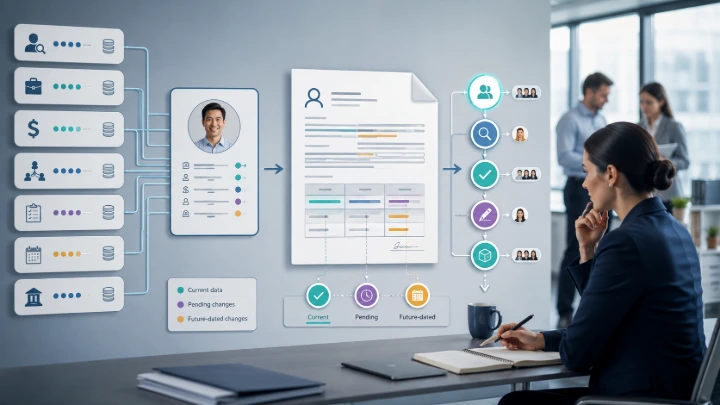
HR document automation depends heavily on data.
It is not enough for a solution to connect to an HR platform. The evaluation should determine whether it can use the right data, from the right source, at the right point in the process.
This matters because employee documents often need more than a basic employee profile.
An employment contract may require recruiting data, position information, compensation details, employment conditions, work location, entity information, manager details, and local clauses.
A variation letter may need to reflect a change that has been entered but is not yet effective.
A document may also need values derived from business rules rather than stored directly in one field.
The evaluation should therefore explore:
- which data objects and fields can be accessed
- whether current and pending values can be distinguished
- how multiple assignments or concurrent employment are handled
- whether external or calculated data can be included
- what happens when required data is missing
- how changes in the source system affect an active document process
A generic integration statement does not answer these questions.
The quality of the document depends on the quality and timing of the data supporting it.
Look closely at template and clause governance
Template capability is often a major focus in document automation evaluations.
Organisations may ask how many templates the system can support, whether templates are built in Microsoft Word, or whether conditional content can be included.
Those questions are important, but they do not address governance.
A more useful evaluation asks:
- How are approved templates identified?
- Can common clauses be reused across documents?
- How are clause changes applied across multiple templates?
- Who can create, edit, approve, and publish templates?
- Can regional or local variation be managed without creating uncontrolled duplication?
- How are effective dates handled?
- Can previous versions be retained for reference or audit?
- What skills are required to maintain the templates after implementation?
The objective is not simply to create automated documents.
It is to create a model that the organisation can maintain.
A highly sophisticated template design may look efficient during implementation but become difficult to operate if only a small number of specialists understand it. Conversely, a large number of independent templates may be easy to create initially but difficult to keep consistent over time.
The evaluation should consider not only what is technically possible, but what is sustainable for the organisation.
Evaluate the workflow around the document

Documents often need to move through several points of review before they are final.
HR may prepare the document. A manager may need to confirm the change. Employee Relations or Legal may review specific wording. The employee may need to sign or acknowledge the outcome. Payroll or another operational team may need visibility of completion.
A workflow feature may exist, but the detail matters.
The evaluation should examine:
- how approval paths are determined
- whether different document types can follow different workflows
- whether approvers can review the actual document
- what information is visible alongside the document
- how reminders and escalations work
- whether tasks can be reassigned
- what happens when an approver rejects or requests changes
- whether the process can update the HR system after completion
- how HR monitors active and overdue items
This is where the difference between a document tool and a connected HR process often becomes clearer.
The goal is not merely to move a file from one person to another. It is to support a controlled decision and communication process.
Do not stop the evaluation at signature
Electronic signature can feel like the natural end of a document process. Operationally, it is not.

Native capability or third-party integration?
The first question is whether electronic signature is a native capability within the product being evaluated or whether it depends on integration with a third-party signing platform.
That distinction can affect the process design, user experience, support model, implementation effort, and total cost.
The evaluation should establish:
- whether electronic signature is included within the product
- whether a separate third-party subscription is required
- how documents and status information move between the two platforms
- whether signing activity can be monitored from the main HR document process
- what happens if the integration or signing transaction fails
- which provider is responsible for support when an issue occurs
- whether charges apply per signature, envelope, document, user, or transaction
- whether expected document volumes could materially affect the operating cost
Legal and regulatory requirements
Legal and regulatory requirements should also be considered across the countries in scope.
Electronic signatures are not necessarily treated in exactly the same way for every document type or jurisdiction. Some countries or employment processes may require particular forms of consent, identity verification, evidence, authentication, witnessing, or record retention.
The evaluation should therefore ask:
- Are electronic signatures accepted for the relevant HR documents in each country?
- Are there document types that require a different form of signature or execution?
- What level of signer authentication is required?
- What evidence of consent, identity, time, and completion is retained?
- Where is that evidence stored?
- Does the signing method support the organisation’s legal, audit, and employee-relations requirements?
These questions may require input from Legal, Privacy, Information Security, or local Employee Relations teams rather than being treated as product questions alone.
Electronic signature should therefore be evaluated as part of the wider document process, not as an isolated feature.
Assess visibility and control
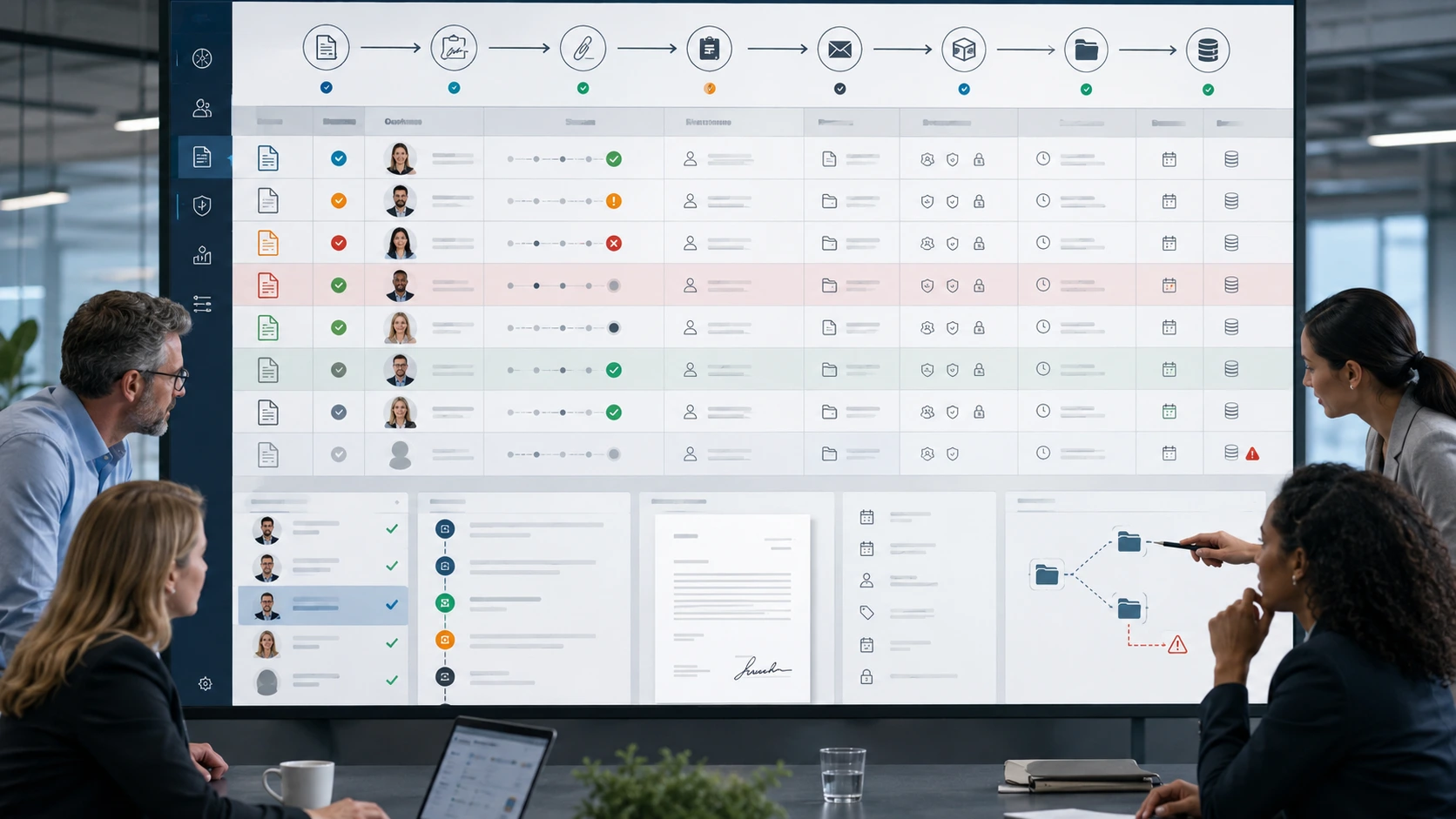
Many HR document processes are difficult to manage because HR cannot easily see what is happening.
A document may be waiting for approval, sitting with an employee, completed but not yet filed, or stored without the correct metadata. Someone may know the status, but the process itself does not provide a reliable view.
A strong solution evaluation should therefore consider whether HR can see:
- which documents are in progress
- who currently owns the next action
- what has been approved, rejected, declined, or completed
- which documents are overdue
- whether the employee has signed or acknowledged
- whether the correct final version has been received
- where the final document has been stored
- whether it is associated with the right employee
- what metadata has been applied
- whether signature evidence and audit history are available
- whether required documents are missing
- how duplicates, superseded versions, or incorrectly filed records are handled
- how retention, archiving, and deletion rules are applied
- what actions occurred and when
This visibility supports more than reporting.
It helps HR manage exceptions, respond to questions, maintain service levels, and reduce dependence on spreadsheets, inboxes, and individual knowledge.
A feature checklist may confirm that reporting is available. A scenario-based evaluation shows whether the information is useful for day-to-day operations and whether the document remains controlled after signature.
The completed document is not just an output. It becomes part of the employee record and the organisation’s governance responsibilities.
Consider the operating model behind the technology
Technology does not own templates, make policy decisions, approve legal wording, or decide how regional variation should be governed.
People do.
That means the evaluation should include questions about the operating model the solution will require.
For example:
- Who will own templates after implementation?
- Who will approve clause and policy changes?
- Who will manage workflows and business rules?
- How will regional requests be reviewed?
- What changes can HR make directly?
- Which changes require technical support?
- How will testing and release management be handled?
- What support is available when a process fails?
- How will responsibilities be divided between HR, IT, Legal, and the solution provider?
These questions help the organisation understand the ongoing cost and effort of operating the solution.
A platform may be highly capable but poorly aligned to the organisation’s skills, governance model, or support capacity.
The right solution is not simply the one with the most functionality. It is the one the organisation can operate effectively.
Ask for evidence, not only assurances
During an evaluation, it is easy to receive broad statements:
- The solution is flexible.
- The workflow is configurable.
- The integration is seamless.
- The platform can support global requirements.
These statements may be directionally correct, but they should be tested:
- Ask to see the capability applied to a relevant scenario.
- Ask which parts are standard, which require configuration, and which require custom work.
- Ask what assumptions need to be true.
- Ask what limitations or dependencies exist.
- Ask who is responsible for maintaining the configuration.
- Ask how the same outcome has been handled in comparable HR environments.
The purpose is not to make the evaluation adversarial. It is to replace general confidence with practical understanding.
Build the evaluation around outcomes
A solution evaluation should ultimately connect back to what the organisation needs to improve.
That may include:
- reducing document preparation time
- improving consistency across templates
- reducing manual data entry
- making approval status more visible
- improving the employee or manager experience
- increasing confidence in final document storage
- strengthening auditability and governance
- supporting greater document volume
- reducing reliance on individual knowledge
- simplifying ongoing template maintenance
These outcomes provide a better basis for decision-making than the number of features demonstrated.
They also help distinguish between capabilities that are essential and those that are simply attractive.
A feature is valuable when it contributes to a defined operational outcome.
Without that connection, the evaluation can become a comparison of functions rather than a decision about how HR should work.
What a stronger evaluation looks like

A stronger evaluation does not discard the requirements checklist.
It uses the checklist as one input.
The organisation still needs to understand functional coverage, security, integration, implementation, support, commercial terms, and product direction.
But those areas should be tested through realistic processes.
A stronger evaluation:
- starts with the operational problem
- uses real HR scenarios
- follows the document from trigger to final record
- tests both standard and exception paths
- examines data timing and quality
- considers template and clause governance
- evaluates workflow visibility
- includes storage, retrieval, and retention
- assesses the operating model required after implementation
- connects capabilities to measurable outcomes
This creates a more complete view of fit. It also reduces the risk of selecting a solution that performs well in a demonstration but leaves the organisation managing the same complexity around it.
From feature comparison to process evaluation
HR document automation is not only about producing a document.
It is about how data, rules, decisions, people, systems, and records come together around that document.
A feature checklist can show whether a solution appears to have the required components.
A process-based evaluation shows whether those components work together in a way that supports the organisation.
That distinction matters.
Because the value of automation is not found in the number of capabilities available.
It is found in how effectively those capabilities improve the way work is done.
Final thought
The most useful question during an HR document automation evaluation is not:
“Does the solution have this feature?”
It is:
“How would this solution support our process from beginning to end—including when things do not go to plan?”
That question moves the evaluation beyond functionality.
It helps reveal the level of manual work that may remain, the governance the organisation will need, and whether the proposed solution can support a more structured and sustainable document process.

A feature checklist tells you what a product can do. A process-based evaluation helps you decide whether it can support how your organisation needs to work.