Strato Reporting for Workflows
Strato Reporting simplifies and optimises the tracking of Strato Document Generation Workflows across the entire employment lifecycle.
By offering a comprehensive high-level report overview, Strato Reporting enables admins to effectively monitor Workflows, and generate reports for auditing purposes.
Requirements
Basic knowledge of Strato Reporting is required.
Workflow Reports
While the Workflow Administration Card and Workflow Monitoring are used to view all the running Workflows and Sub-Workflows in Strato, with Strato Reporting, each unique Workflow is represented as a single row, along with relevant details such as the start and end dates, and the status.
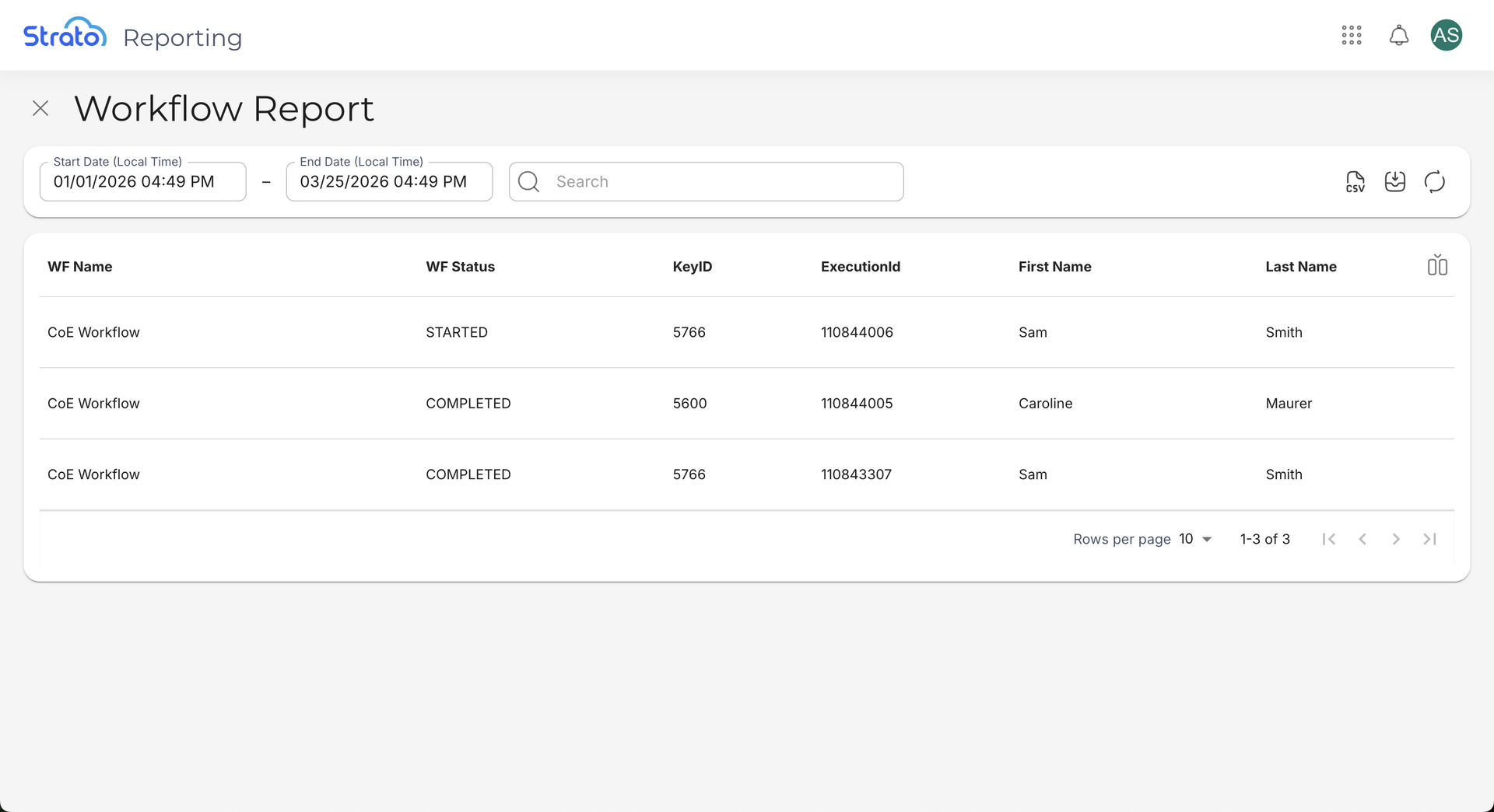
This simplifies the user experience of monitoring and managing Workflows. Previously, you had to use multiple Workflow Report Cards to manage a primary Workflow that involved multiple Sub-Workflows. Now, with Strato Reporting, you can manage all of those Workflows from a single page.
OData Entities
Strato Reporting makes use of the following OData entities in Workflow reports. Some corresponding fields of the OData entities can be found in the Properties section of the Dashboard.
Containers (Entity Name: Containers)
Holds the values of parameters used in Workflow executions.
Property | Explanation |
|---|---|
ID | [KEY] An auto-generated ID number to identify each entry in this entity. |
Name | The name of a specific container. |
Is Form Field | A true or false value. Set to true if the mapping of the container is from a Form Field. |
Is Encrypted | A true or false value. Set to true if the Encrypt option of a container is enabled. |
Value | The current value of a specific container. |
Last Changed On | The date and time when the container was changed. |
Execution | A navigation component that directs to the Workflow Executions entity. |
Strato Sign (Entity Name: StratoSigns)
Tracks Strato Sign actions made by users in Workflow executions. Includes information about which user signed, at which Workflow step, and when.
Property | Explanation |
|---|---|
Step Status ID | [KEY] The identifier of the Workflow step where the signature was recorded. |
Execution ID | The execution ID of the Workflow. |
Actor ID | The user ID of the user who acted on the User Decision. |
Last Changed On | The date and time when the recorded signature was changed. |
Signature ID | The identifier for the recorded signature. |
Key ID | The Key ID used in the Workflow (and the recipient of the document). |
Sign Date | The date and time the signature was affixed to a document. |
Document | Contains the information on the document that was signed. |
Workflow Executions (Entity Name: WorkflowExecutions)
Contains the information about the execution of a Workflow, including its progress and status.
Property | Explanation |
|---|---|
ID | [KEY] An auto-generated ID number to identify each entry in this entity. |
First Name | Contains the first name if the Key ID is a user/employee or candidate. Otherwise, it remains blank. |
Last Name | Contains the last name if the Key ID is a user/employee or candidate. Otherwise, it remains blank. |
Last Changed On | The date and time when the Workflow Execution was changed. |
Execution ID | The execution ID of the Workflow. |
Name | The name of the Workflow. |
Key ID | The Key ID used in the Workflow. |
Start Date | The date and time the Workflow was initiated. |
Finish Date | The date and time the Workflow was completed. |
Containers | Navigation component that directs to the Containers entity. |
User Decisions | Navigation component that directs to the User Decisions entity. |
User Decisions (Entity Name: UserDecisions)
Tracks decisions made by users at Workflow steps, such as approving or rejecting.
Property | Explanation |
|---|---|
ID | [KEY] An auto-generated ID number to identify each entry in this entity. |
First Name | Contains the first name if the recipient is a user/employee or candidate. Otherwise, it remains blank. |
Last Name | Contains the last name if the recipient is a user/employee or candidate. Otherwise, it remains blank. |
Email | Contains the email address if the recipient is a user/employee or candidate. Otherwise, it remains blank. |
Is User Group | A true or false value. Set to true if the recipient of the User Decision is a user group. |
Last Changed On | The date and time when the User Decision step was changed. |
Step Name | The name of the step in the Workflow. |
Step Status ID | The identifier of the Workflow step where the signature was recorded. |
Action | The name of the Action selected by the recipient. If no decision is selected, this field is blank. |
Start Date | The date and time the Workflow was initiated. |
Finish Date | The date and time the Workflow was completed. |
Status | The current status of the User Decision step. |
Name | The name of the User Decision step. |
Execution | A navigation component that directs to the Workflow Executions entity. |