Strato 2025-06
The 2025-06 release brings more efficient document generation and management and lays the groundwork for future enhancements to security and authorization.
People Hub now features a Compliance Tracker for admins to manage and monitor their compliance documents.
A new Set Legal Hold permission has been added to the People Tool in Policies.
The Visibility setting under the Section Settings tab in Document Generation is now hidden by default to reduce issues with duplicate versions. Other behaviors related to Visibility are modified as well.
See all of these new features and enhancements documented in detail below:
New Features
Strato Platform
Compliance Tracker (Alpha Version)
Compliance Tracker is a new feature that enables admins to efficiently manage and monitor all employees with missing compliance documents. It provides a comprehensive view for HR and admin personnel to track and address employee non-compliance.
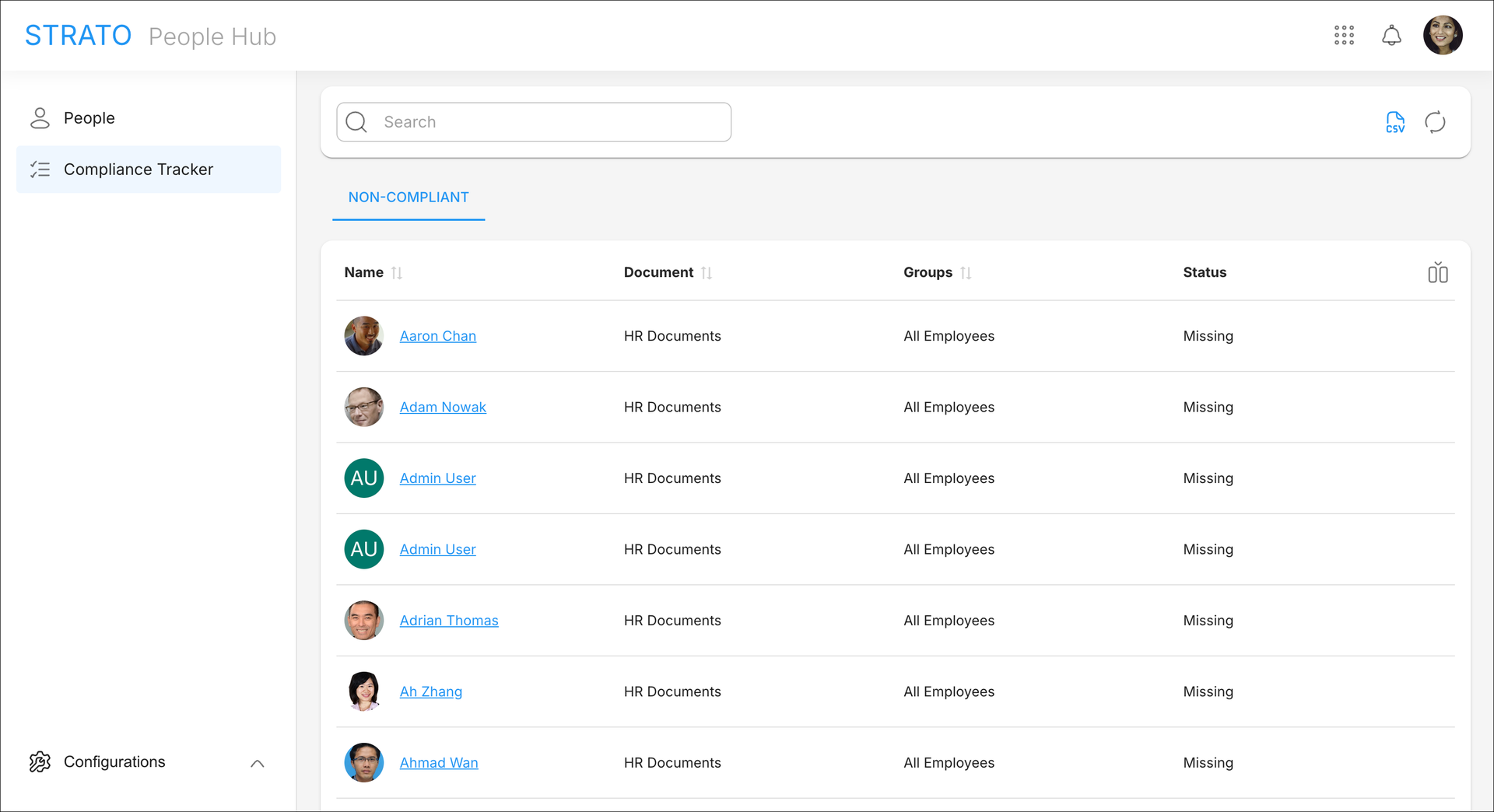
Compliance Tracker enables admins to:
- View the list of all employees with missing compliance documents, and search within the list for users, documents, and Groups
- View the details of a missing compliance document of an employee
- Export the list of the employees' compliance status as a CSV file
Learn more about the New Feature - Compliance Tracker.
Set Legal Hold
The Authorization Framework now allows Policies to define Set Legal Hold permissions. The Set Legal Hold permission is an Action under the People Tool.
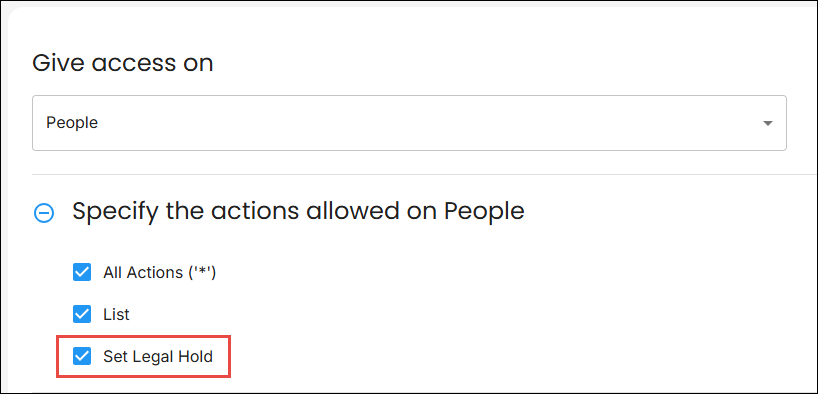
Currently, adding or removing Legal Hold on a user is only available in Storage in Strato 1.0. As of this release, the Set Legal Hold permission in Policies will not be evaluated. This will be expanded upon in future versions.
Learn more about how to Manage Legal Hold.
Enhancements
Strato Document Generation
Visibility Settings under Section Settings in Templates
To reduce the issues of template components having multiple published versions caused by Catalog Specific and Global sections, the Visibility settings under the Section Settings tab is now hidden by default.
Users can restore the Visibility settings by installing Security Enhancement - Restore Visibility Settings in Documents in the Upgrade Center.
When installed, the Visibility settings now behave as follows:
- The visibility of existing Document Template Specific sections cannot be changed to Catalog Specific or Global.
- Existing Catalog Specific and Global sections can be changed to Document Template Specific, or they can retain their original visibility settings.
- When reusing Catalog Specific or Global sections into a document template, they are now set to Document Template Specific by default. This also clears duplicate published versions of the section.
- Newly created sections are automatically set to Document Template Specific and cannot be changed to Catalog Specific or Global.
Other Updates and Corrections Delivered
Strato Platform
Incorrect Report Card Settings When Importing Dashboards
[Component: Package Manager]
When importing Dashboards via the Package Manager, the Report Settings of the imported Dashboard did not match the Report Settings of the source Dashboard. This was caused by a missing logic when getting the Catalog for the imported Dashboard. This issue has been fixed by adjusting the code and conditional statements to ensure the correct Catalog is used for the imported Dashboard.
Strato Document Generation
Error When Signing Documents
[Component: Field Settings]
An error occurred when a document template containing an e-signature field with specific data types was processed through a workflow with a User Decision link for signing via Strato Sign. This issue has been fixed by removing the field types Free Text, Date Input, and Custom Field from the selection as they are no longer supported.
Document is Dimmed When Viewed in User Decision Step
[Component: Document Preview]
Documents appeared dimmed on iPhones when viewed during the User Decision step of a workflow. This was caused by a scrolling setting specific to iOS. The issue has been fixed by adjusting the scrolling behavior, which ensures that documents now display clearly.
Non-Counter Fields Being Shown as Counter Fields in Preview
[Component: Document, Email, Forms - Preview]
A frontend function caused non-Counter fields in Document, Email, and Form Templates to be rendered and shown as Counter fields in Preview Mode. The code has been updated to correctly identify and distinguish between Counter fields and non-Counter fields.
Banner Size Does Not Align With Email Body
[Component: Email Template]
Previously, banner sizes for email templates were fixed and did not adjust with the email body. To fix this issue, the email template editor has been updated to allow percentage-based (%) image sizing, which enables banner images to automatically adjust to align with the email body.