File Management - Overview
Strato Storage has a File Management module that enables the Document Management System capability in Strato. This module allows administrators to manage company-wide files and folders. It can serve as a company's centralized file storage where the storage/file administrators can set and control document access and security, making the relevant folders and files available to the right people, and in the right storage locations.
It also allows the admins to construct the overall folder structure that can be seen by employees through their My Files cards (Strato Dashboard Widget) given their proper access permissions to the folders and files applicable for them. From there, they can either download specific files or save the links for easy access later on.
The File Management is similar to the Strato Library, except that the contents of the folders within this module are the documents and static files visible to the employees via their My Files card (Dashboard Widget - Storage Card).
Additionally, access to File Management and its contents, following the company's file structure, will depend on the organization's users' authorization settings.
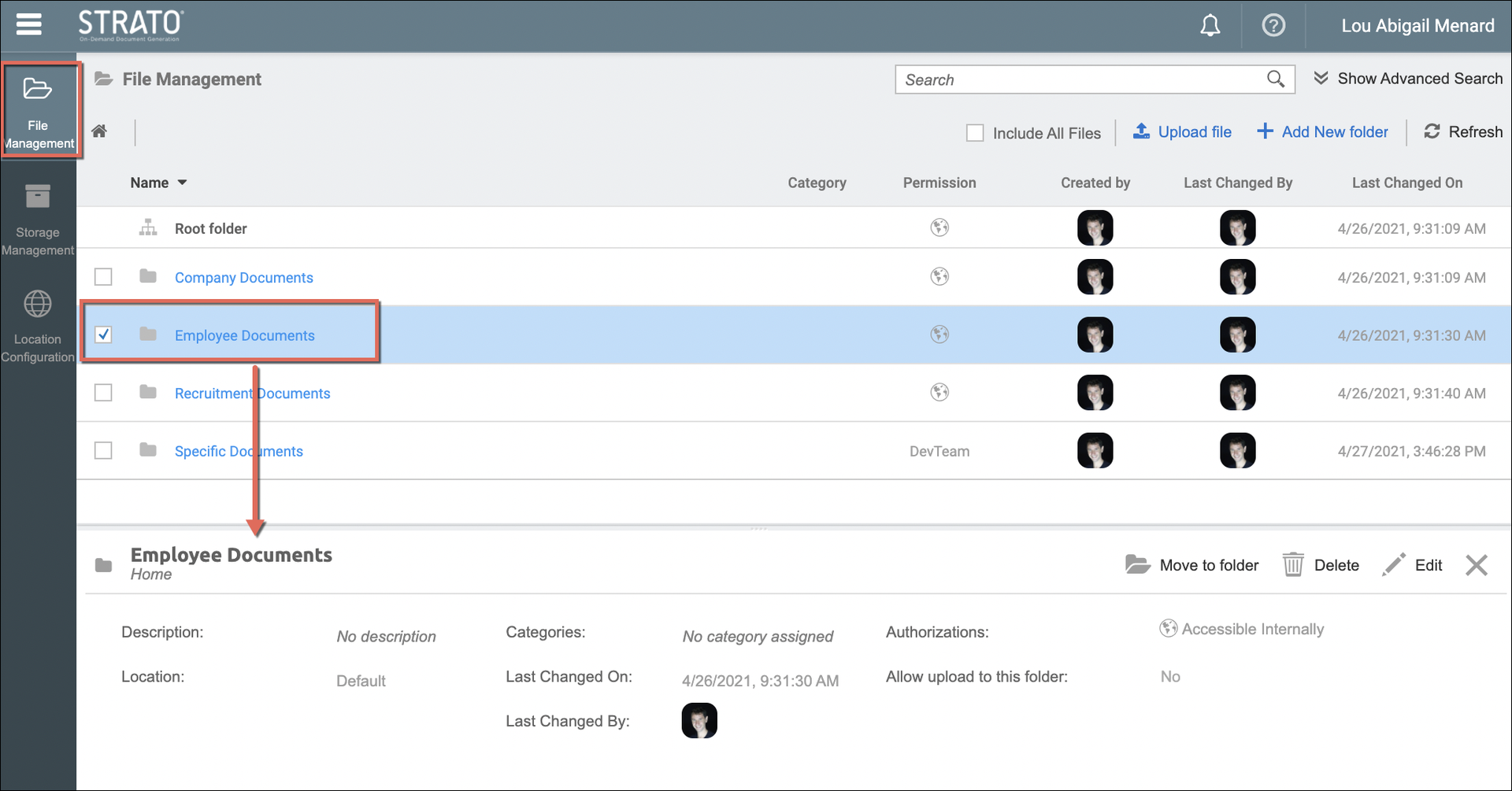
The sample image below shows the File Management screen, with a selected folder, and the actions available for that selected folder.
Features / Functionality
With the File Management feature, HR Administrators (depending on the authorization) can:
- Access, search, and view stored files and folders (hidden files can be viewed as well)
- Upload static files
- View details of stored files
- Create and organize folders
- Make changes to the files and folders
- Assign documents to employees which will show up on their My Files Dashboard Card
- Set authorizations to files and folders (eg. users belonging to HR managers group can view the folder or only users under the Australia Legal Entity can edit the folder)
- Categorize files and folders
- Move documents and files around to different folders
- Track who created or made changes to folders and files/templates
- Download files
- Share certain files directly, even to users outside of the organization via 'Link to a file' functionality
Read more about managing your files, templates, and folders from the related articles linked below.
Integrated Features and Tools
- Strato Storage - Saving or uploading files is made possible via Strato's Storage capability. The GDPR compliant storage solution automatically stores files to the correct location depending on the business rules of your organization. (Overview: Strato Storage)
- My Files Card - Employees can access their files via their My Files card (ESS card accessible from their SuccessFactors via the Strato Dashboard tile). File managers can upload documents for employees in the File Management which then reflects in the employees' respective My Files cards.
- Generator Card - HR and Managers can generate documents and store them directly for their employees. (accessible from their SuccessFactors via the Strato Dashboard tile). After generation, they can upload their documents in Strato Storage (Generator Card Overview).
- Strato Workflow (Store Document Step)- Automatically store documents generated within a Strato Workflow to the configured Strato storage locations via the Store Document Step.
Access File Management
To access the File Management, please read: Access and Navigate File Management
Related articles
- Add Folders in File Management
- Move Folder and Files (File Management)
- Upload and Download Files in File Management and Storage Management
- View Folder and File Details (File and Storage Management)
- Edit a Folder or a File in File and Storage Management
- Show All Users Files in File Management
- Advanced Search and Filter (File and Storage Management)
- Authorizations to Folders and Files (File and Storage Management)
- Assign Categories, Validity Rules, and Metadata to Documents in Strato Storage
- Allow File Upload to a Folder (File Management)
- Delete Folders and Files in File Management